Howto Block Google Groups Spam in Rspamd
Reading time: 3 minutes
Spammers have learned that Google Groups is a convenient relay: create a free group, invite your victims, and push advertising, scams, or phishing through Google’s reputable infrastructure. Because the mails are delivered by Google, SPF, DKIM, and DMARC checks pass, and most filters stay quiet. If you do not have legitimate Google Group traffic into your mail system, you can block these messages with a tiny Rspamd rule.
Why Google Groups Spam is Hard to Catch
A typical spam run via Google Groups arrives from a mail-*.google.com server
with valid authentication. The envelope sender looks like
ad7+bncBCE4JP6LW4MBBZHTUXHQMGQEYI5O3BY@somedomain.tld and the From: header
points to an unsuspicious mailbox on the same domain. Standard Rspamd rules
such as DBL_SPAM or BAYES_SPAM may catch some of it, but spammers rotate
domains fast enough to stay below the combined score threshold.
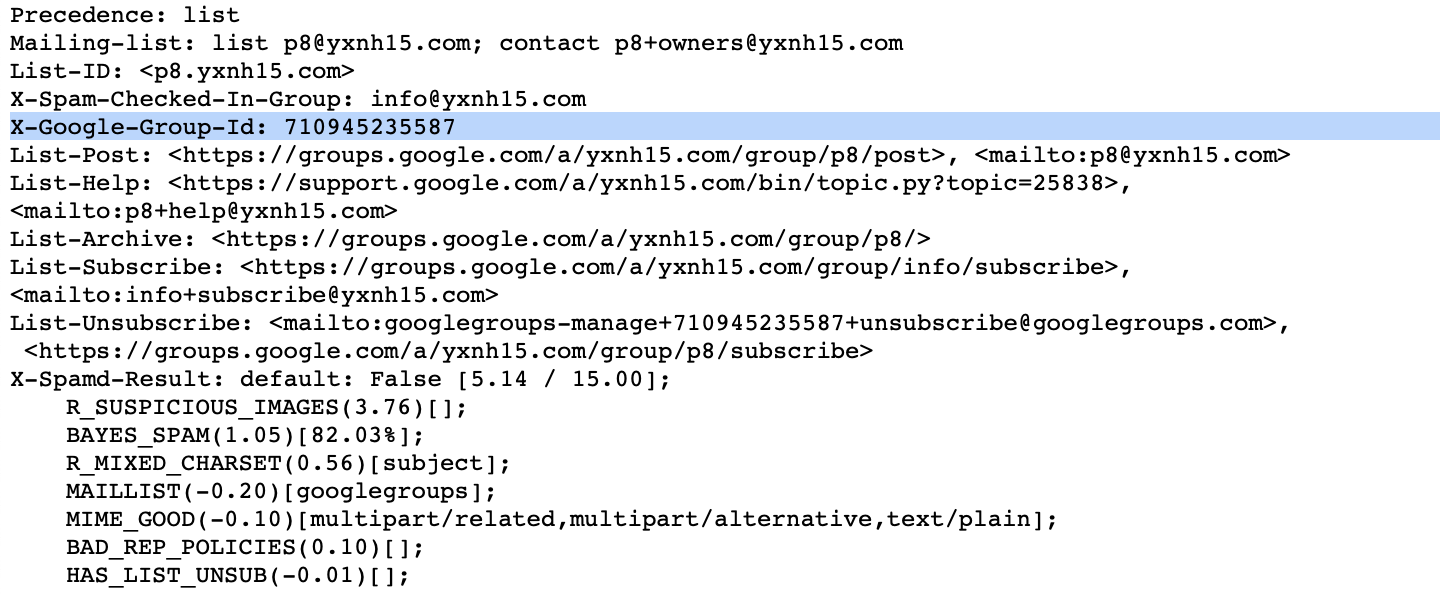
The reliable signal is the X-Google-Group-Id header. Google adds it to every
message posted to a Google Group, and you cannot forge it through normal SMTP
delivery — the message has to actually pass through Groups
infrastructure.
Here are the relevant headers from a real spam message delivered through Google Groups:
From: TechTrends Haushalt <techtrends@bn.hethbeauty.de>
Subject: Ich dachte, mein Kühlschrank ist sauber. Dann landete meine Familie
         in der Notaufnahme
Precedence: list
Mailing-list: list ad7@bn.hethbeauty.de; contact ad7+owners@bn.hethbeauty.de
List-ID: <ad7.bn.hethbeauty.de>
X-Google-Group-Id: 1059602057684
List-Post: <https://groups.google.com/a/bn.hethbeauty.de/group/ad7/post>,
           <mailto:ad7@bn.hethbeauty.de>
The Rspamd score for this message was 14.61 — just below the reject threshold of 15.00. One more small boost was all that was needed to stop it.
The Lua Rule
Create a new local Lua file so you do not touch the packaged Rspamd rules:
root@server $ vim /etc/rspamd/lua.local.d/google_groups.lua
Paste this snippet:
rspamd_config:register_symbol({
  name = 'GOOGLE_GROUPS_SENDER',
  score = 15.0,
  description = 'Mail sent via Google Groups',
  group = 'blocklist',
  callback = function(task)
    if task:get_header('X-Google-Group-Id') then
      return true
    end
    return false
  end
})
The rule registers a new symbol GOOGLE_GROUPS_SENDER. Whenever the callback
returns true, the symbol fires and its score is added to the message.
Pick the score depending on how strict you want to be:
score = 15.0hits the default reject threshold and blocks the message outright.score = 8.0keeps the message but pushes it well past the “add header” threshold so it lands in the user’s Junk folder.
If you have users on your server who legitimately subscribe to Google Groups mailing lists, start with the lower score and let it rewrite the subject or move into Junk before committing to a hard reject.
Validate and Reload Rspamd
Before reloading, always check that the configuration still parses:
root@server $ rspamadm configtest
syntax OK
If the test succeeds, reload Rspamd:
root@server $ systemctl reload rspamd
A reload is sufficient — no need for a full restart.
Test Against an Example Message
The fastest way to confirm that the rule works is to feed a saved
.eml sample into rspamc. You can use a spam message that arrived on your
own server, or download the example used in this article:
Drop the file into a working directory and run:
$ rspamc -v symbols ~/tmp/google-groups-spam-example.eml
The relevant line in the output should now be:
Symbol: GOOGLE_GROUPS_SENDER (15.00)
You will also see the total score jump by 15 points compared to the headers
the sample was recorded with, and the action should flip to reject.
Summary
A single header check is enough to stop most Google Groups spam runs. The
X-Google-Group-Id header is set by Google itself and cannot be forged by a
direct SMTP sender, which makes the rule precise and low-maintenance. Start
with a score of 8.0 if you are unsure about legitimate Google Groups traffic
on your server, or go straight to 15.0 to reject outright.