The Spamhaus Do Not Route Or Peer
(DROP) lists are the
worst of the worst: netblocks that are leased, hijacked, or outright owned by
professional spam and cyber-crime operations. Spamhaus calls
them an advisory “drop all traffic” dataset, and that is exactly how you should
treat them. No SMTP session, no
HTTP request, no SSH login attempt from those ranges is ever going to be
something you want.
DROP is a small subset of the Spamhaus Blocklist (SBL) - roughly 1,700 IPv4
networks and 90 IPv6 networks at the time of writing - and false positives are
extremely low, because address space under the control of a legitimate network
is never listed. That makes it one of the very few public lists you can safely
drop at the firewall instead of only scoring it in your mail filter.
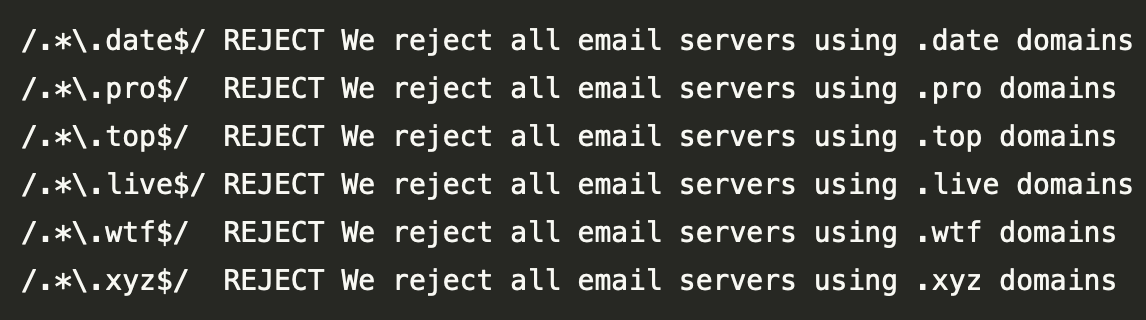
Blocking or blacklisting entire Top Level Domains
(TLDs) used for hostname in email server
setup can be a very effective solution to stop low reputation mail servers
delivering mails to your email system(s).
As most email providers use common TLDs like .net, .com
or .de in their email setup, you can selectively block new or low reputation
TLDs and this way reducing a lot of unwanted emails.
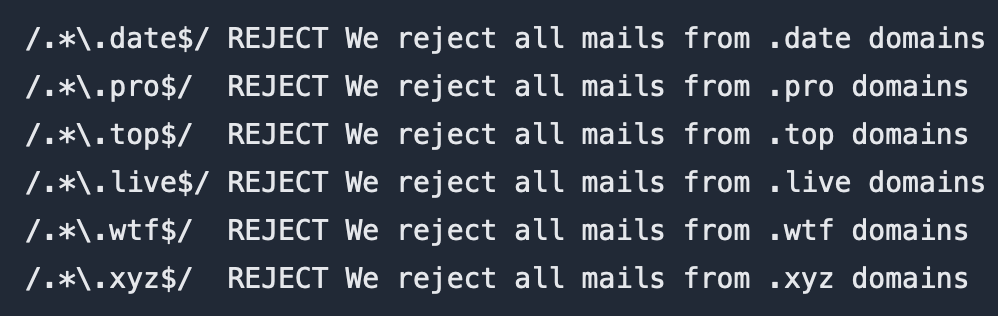
Blocking or blacklisting entire Top Level Domains
(TLDs) in Postfix mail server may
have a big impact to reduce spam,
phishing, and other unwanted emails. Dependent on the use case of your
systems it is a valid and effective solution. The only drawback is, to monitor
your email traffic and check, whether valid emails from blocked TLDs are sent to
your systems. Blocking a whole TLD is mostly a temporary thing, as the bad guys
move on if the domains on a specific TLD are not usable for their cases.
You have built your local IP blacklist for
Postfix.
Invested time to analyze server logs or Rspamd history to
blacklist single hosts, IP addresses, or even whole networks. But how well is it
working compared to the public DNS blocklists
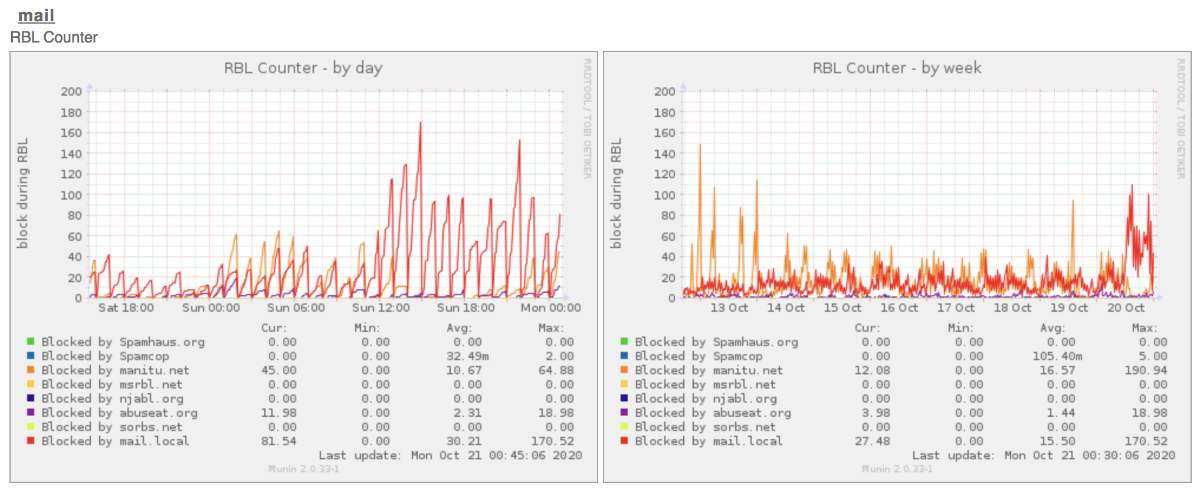
(DNSBLs) you are using? Time to see the results
and get some visual insights through Munin Monitoring
System.
Setup your blacklist for Munin
First of all, you have to decide how to visualize the data in your graph. There
are different solutions you can approach. You may want so kind of overview, to
see how many hits your blacklist has. Maybe you want to monitor or compare the
results to public or payed blacklists you are using.
You know those same hosts, providers, or whole networks, who get through your
spam filter and spam your users with the same content over
and over again. By building up your blacklist in
Postfix, you can stop them from bothering you and
your users. We will explain how local blacklists work in Postfix and how to use
them with
whitelists
to have better control and reduce errors.
Check before you blacklist
Blocking other hosts must be a well-thought decision because blocking single
hosts, IP addresses, or even whole networks will stop all delivery attempts to
your mail servers.
If you use any blacklists for email services,
whitelisting important Hosts, single IP
Addresses, and even whole networks is an essential task. By
whitelisting valuables email services to your users or even customers, you as
admin won’t reject important email communication.
Blacklisting in Postfix
If you use any blacklist service or has your
blacklist
in your Postfix setup, you will probably find similar logs:
root@server $ grep "blocked using" /var/log/mail.log
Dec 17 4:07:18 server postfix/smtpd[21213]: NOQUEUE: reject: RCPT from
unknown[1.2.3.4]: 554 5.7.1 Service unavailable; Client host [1.2.3.4]blocked using ix.dnsbl.manitu.net; Blocked - see http://www.dnsbl.manitu.net/lookup.php?value=1.2.3.4;
from=<x0h0ihbxazf@somedomain.example> to=<cp57ouwn7zm9@mydomain.example> proto=ESMTP helo=<[1.2.3.4]>
As you can see in this example, IP Address 1.2.3.4 was blacklisted by a
third-party service.
MailMum offers individual services for email administrators to monitor incoming
mail traffic and to control it by blocking IP addresses or even IP networks of
abusive systems using Real-time Blackhole List (RBL) technology. The admin has
full control over the listings by defining parameters, blacklisted (abusive),
and whitelisted (trusted) IP addresses. The defined rules may apply for the
whole account down to an individual server.
Mail System Today
Provided by several sources email traffic is up to 90% or unwanted emails
(called spam or junk). Controlling them through spam filters (like
SpamAssassin or Rspamd)
is hard as it is expensive by teaching, running, and maintaining them. Also,
this high load of unwanted emails wastes a lot of costly resources that must be
paid and run by specialists.
A name, domain, logo, and a draft website - this is the way
MailMum was born out of an internal project.
From a necessity to this service
MailMum was born out of a need to face problems with unwanted emails called
spam or junk. As filters like Spamassassin were
good, but spammers are human, their job is to figure out how to bypass them.
They will try and will find ways to reach your inbox.